One button, everywhere you watch
Yoink It drops a Download button right where you already are, and a power-user popup for everything else.
Find a video
Open a YouTube watch page, an X post, an Instagram reel, or a TikTok / Reddit / Facebook / Twitch / Rumble video — the button appears in YouTube's action row or as a floating pill on the others. Or just paste any link into the popup.
Yoink it
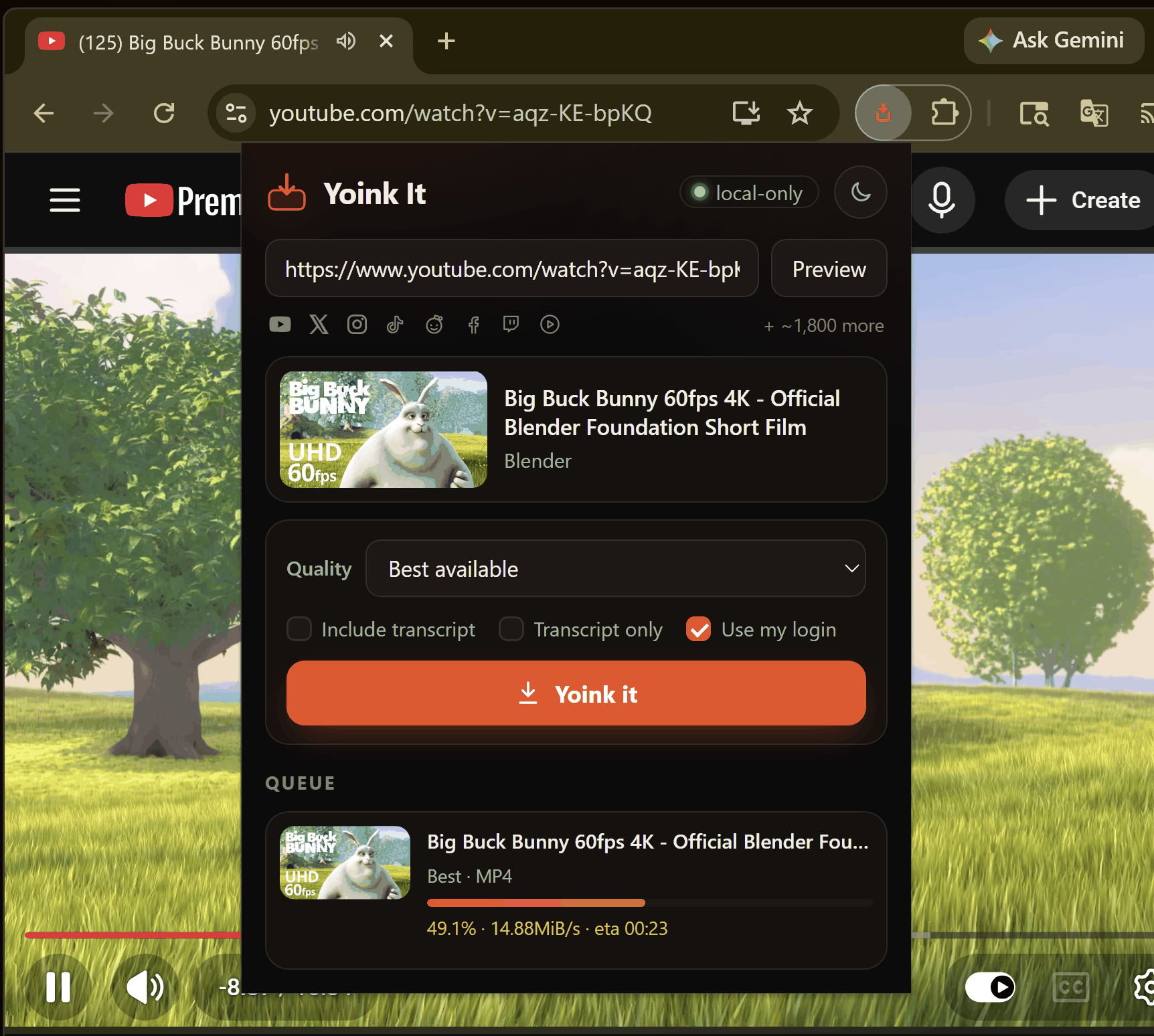
Click once. Or open the popup to paste any link, pick quality up to 4K — or audio-only MP3/M4A — and watch a live queue with progress bars.
It's on your disk
Files land in a local folder with a "Show in Finder" button. Want the words too? Get a clean Markdown transcript — from captions, or local speech-to-text when there are none.
What's new in 0.7.0
The biggest update so far. Everything still runs on your own computer.
- Clips with chapter snap. The ✂ next to Yoink it saves just part of a video — drag the handles, type times, or use [ and ] from the player; on YouTube videos with chapters the handles snap to chapter marks. Works on YouTube watch pages and Shorts, X, and Instagram.
- Shorts rail. Round Yoink and Clip buttons in the Shorts rail, matched to YouTube's own, plus Yoink it / Yoink a clip in the ⋮ menu.
- Stop and Retry, with real progress. Page buttons now count Queued → Working → 42% → Saved; hover one that's downloading to Stop it, and Retry resumes where it stopped.
- Playlists. A strip under Play all saves the next 5 videos you don't have yet; a picker chooses Next 5 / 10 / 25 / All new, positions like
6-10, 14, or single rows; the popup shows each run as one card with Yoink next 5. - Side panel and history. Keep Yoink It open in Chrome's side panel (Alt+Shift+Y, ⌥⇧Y on Mac) with 30 days of searchable history, stored on your computer only, and Show in Finder / File Explorer on every finished file.
- Audio clips and one Quality setting. Clips can be M4A (a lossless copy) or MP3, and the popup's Quality choice is now the default for every on-page button.
- Mac-compatible formats. A new setting (on by default on a Mac) asks for H.264 + AAC, so new files preview in Finder and play in QuickTime — up to 1080p, the highest YouTube offers in H.264.
- Windows web installer.
yoinkit-setup.exeis now about 4.5 MB and downloads about 115 MB of tools during setup, checking each one; an offline installer (about 92 MB) bundles everything.
Does it upload my videos to a server?
No. The download runs on your own computer, the opposite of an "online video downloader" site, so your videos are never uploaded anywhere.
Your videos stay on your computer
No account and no upload. The download engine runs locally and writes only to your Downloads folder.
Built to keep working
Powered by yt-dlp, the open-source engine that ships fixes within days when sites change their players — and already supports ~1,800 sites.
Readable transcripts
Turn any video into clean, timestamped Markdown — de-duplicated from captions, or transcribed locally with Whisper when captions don't exist. It never blocks your download.
Minimal footprint
The extension only touches the handful of sites it supports — no <all_urls>, no tracking. Just nativeMessaging, storage, activeTab, contextMenus, and — new in 0.7.0 — sidePanel, scripting, and alarms.
Help keep the private alternative alive
There's no company here — nothing to sell, no ads, nothing to harvest. Yoink It rides on
open-source yt-dlp and ffmpeg,
which patch almost weekly as sites change, and keeping pace with that is real, ongoing work.
If this saved you time — or a trip to a sketchy downloader site — a small contribution keeps
it free, current, and clean for everyone.
No pressure, ever — the tool is yours either way.
How does it work under the hood?
| Half | What it does |
|---|---|
The extensionapp/ |
A Manifest V3 Chrome extension. Drops a one-click Yoink it button onto YouTube, X,
Instagram, TikTok, Reddit, Facebook, Twitch, and Rumble, plus a popup that takes any of ~1,800
yt-dlp sites — with quality/format options, a live queue, and Markdown transcript export. |
The native hosthost/ |
A tiny local program the extension talks to over Chrome's Native Messaging channel.
It runs yt-dlp + ffmpeg to actually
fetch and mux the media into ~/Downloads/yoinkit/. |
yt-dlp is the
battle-tested engine that handles all of that and ships fixes within days — and because it
supports ~1,800 sites, Yoink It reaches well beyond its eight first-class ones.
What do I need before installing?
- Google Chrome (current version).
- macOS 11+. The installer adds
yt-dlpandffmpegfor you (via Homebrew, which it installs if missing). - A network connection for the first install.
python3. You don't need to install it yourself.- Google Chrome (current version).
- Windows 10 or 11.
- No Python required. Setup downloads private copies of Python,
yt-dlp,deno, andffmpeg(about 115 MB) from their publishers and checks each one. - A network connection during setup — or use the offline installer (about 92 MB), which bundles everything.
- About 400 MB of free disk space.
Install
-
Download & unzip the releaseDownload the installer
Click Download above to get
yoinkit-mac-0.7.0.zip(about 0.36 MB). Double-click it in your Downloads folder and it unzips to a folder with the same name,~/Downloads/yoinkit-mac-0.7.0/. Leave that folder where it is: Chrome loads the extension from it. Inside areapp/(the Chrome extension),host/(the installer) and aREADME.txt.yoinkit.media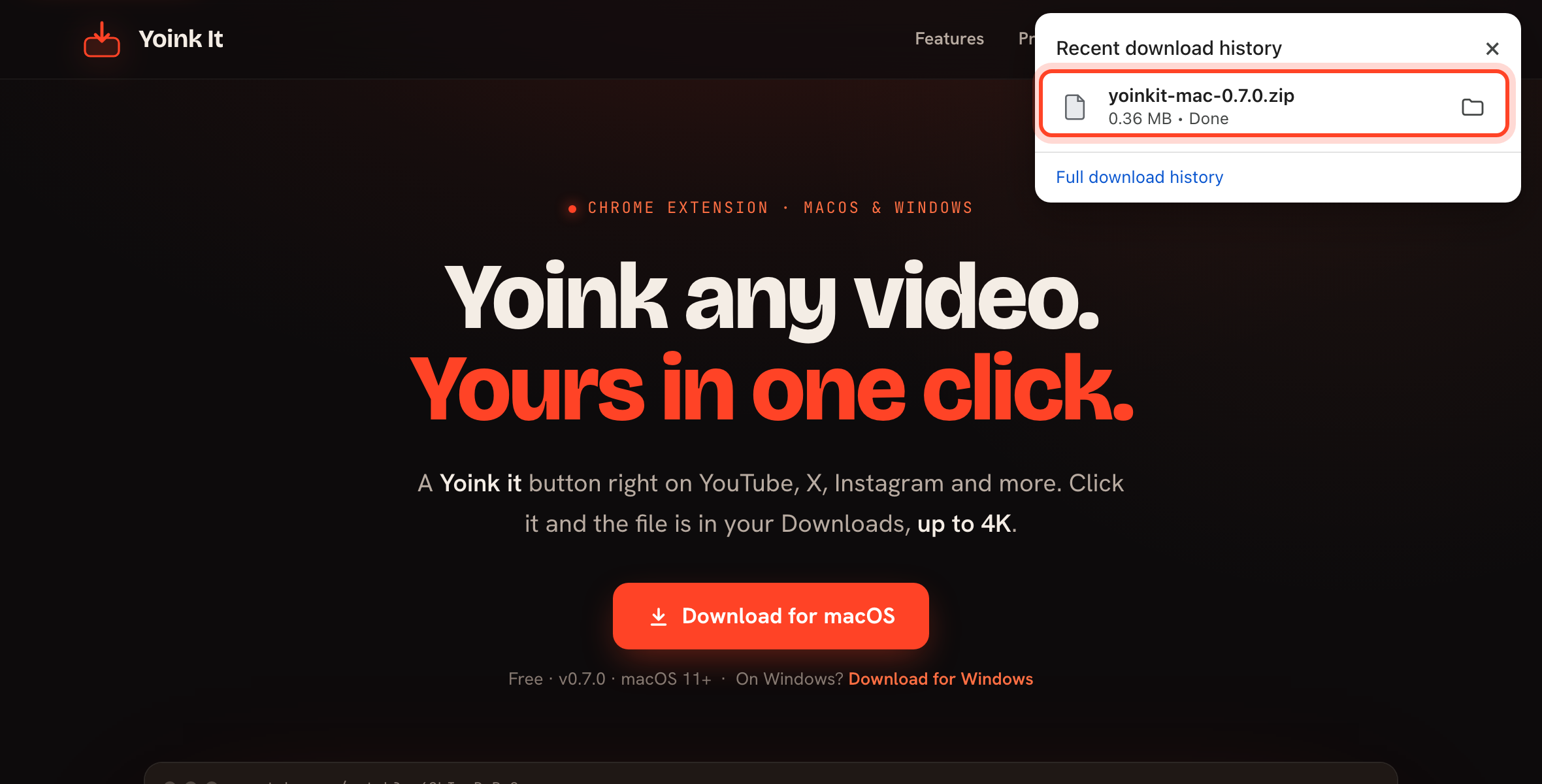
Downloaded. Chrome shows yoinkit-mac-0.7.0.zipwhen it's done. Double-click it in Downloads to unzip.Click Download for Windows above to get a single file:
yoinkit-setup.exe(about 4.5 MB). That's the whole installer: no zip to unpack, no folders to arrange. It's a web installer, so it downloads the media tools (about 115 MB) while it runs. Save it somewhere you can find it, like your Downloads folder.yoinkit.media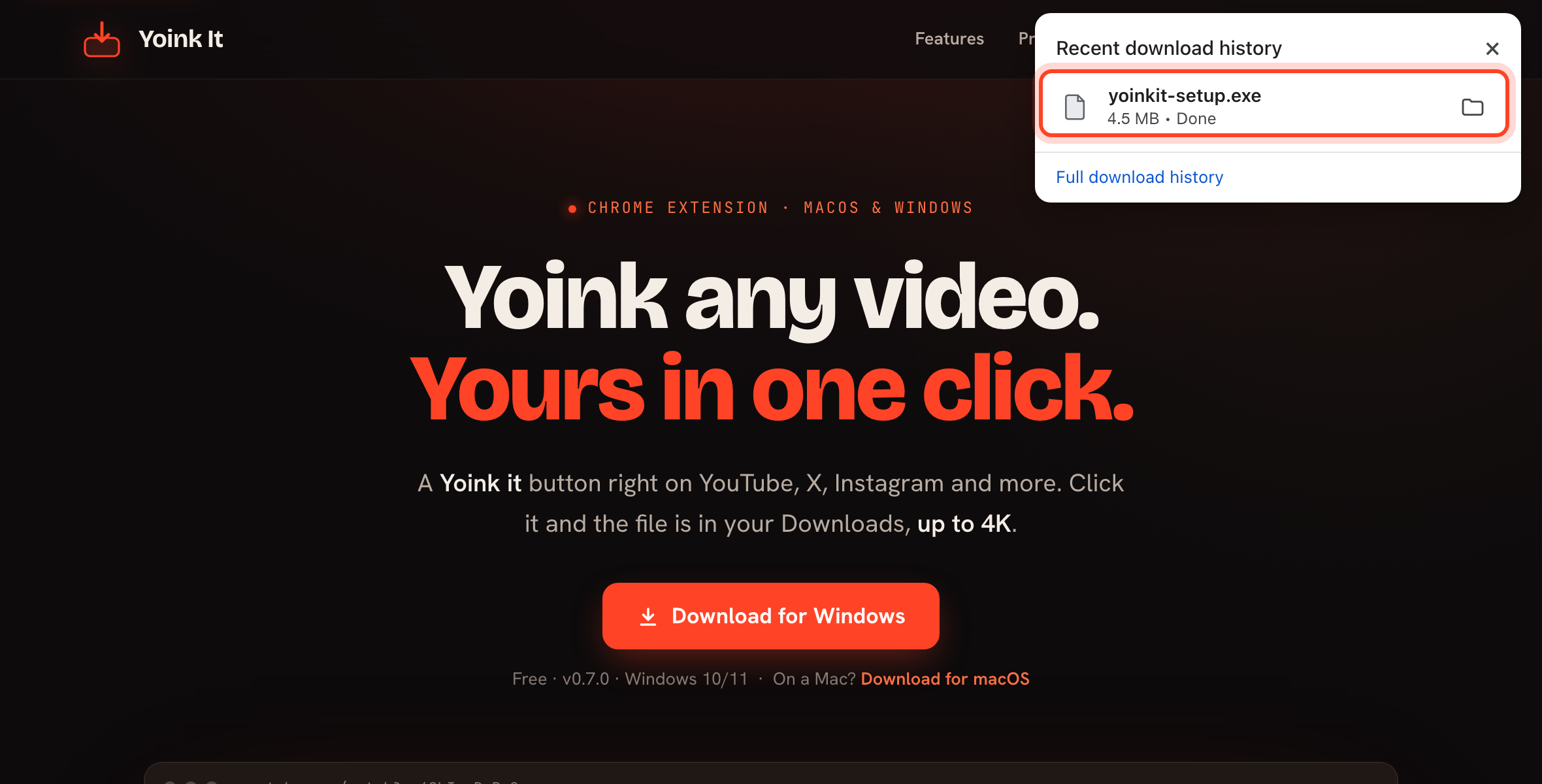
The installer, saved. Chrome shows yoinkit-setup.exewhen it's done. Click it to start the wizard.Chrome says the file "isn't commonly downloaded"? That's because it's new. Click the warning in Chrome's download list, then click Keep, and open the file.
Installing offline? The offline installer,yoinkit-setup-offline.exe(about 92 MB), includes every tool and needs no internet during setup. The steps are the same. -
Run the installer
Double-click
yoinkit-setup.exeand click through the setup wizard: Next, then Install. No terminal, no commands, and no admin password (it installs just for you). After you click Install, it downloads the media tools — Python,yt-dlp,deno, andffmpeg, about 115 MB — from their publishers, checks each one, and sets up the native helper — nothing else for you to install.Expect these prompts. Because the installer is brand-new and not yet code-signed, Windows may show a red "Windows protected your PC" screen. This is normal for new apps — click More info, then Run anyway, and the wizard opens. Later, in Chrome, you'll turn on a Developer mode switch (step 3); that's expected too. (We're working on a signed installer to remove this prompt.)yoinkit-setup.exe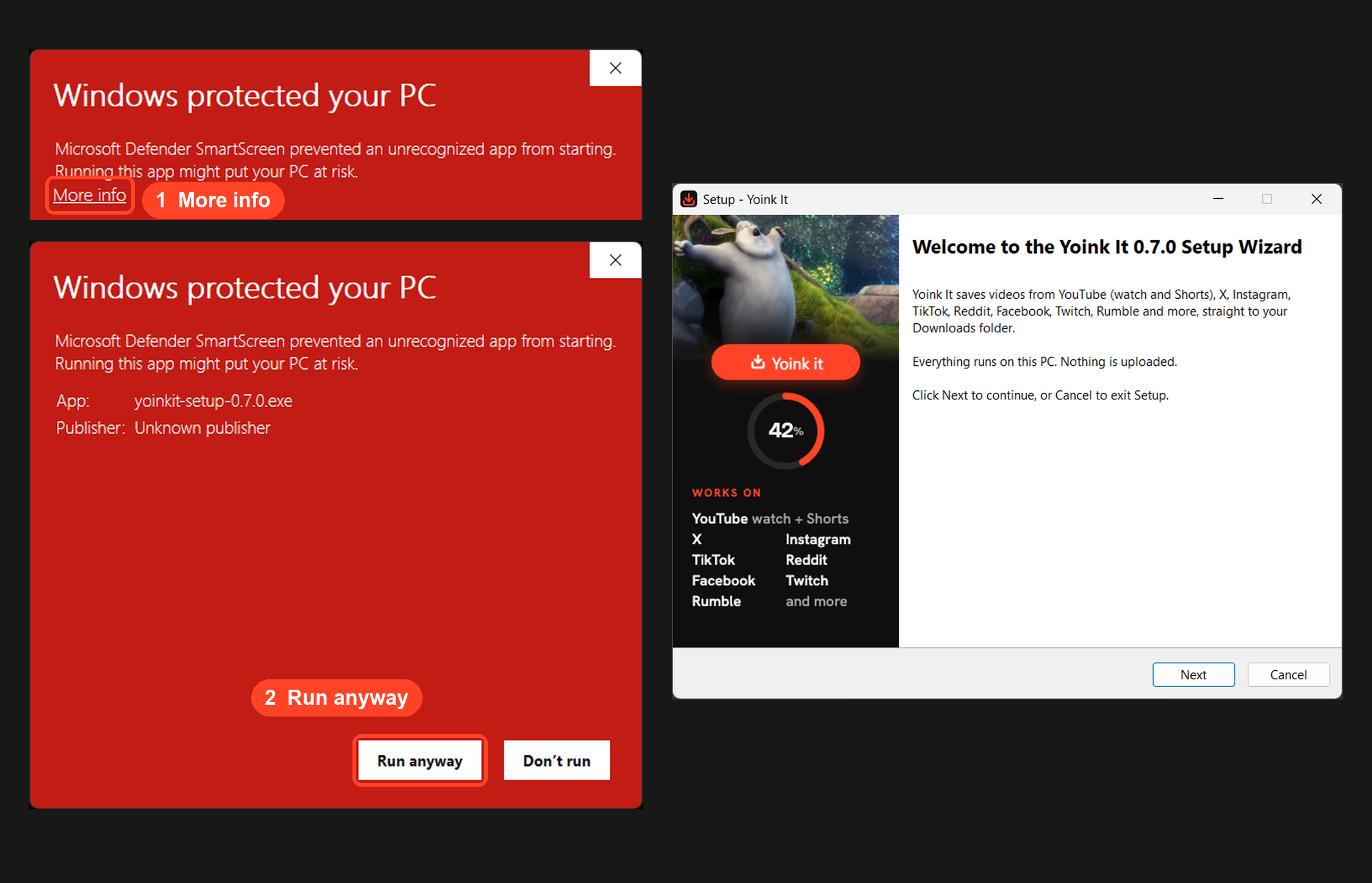
More info → Run anyway. A one-time confirmation Windows shows for any new, unsigned app — then it's a normal setup wizard. On the Last step page, click Next: Chrome and the extension folder open, and the installer copies chrome://extensions to your clipboard. The final page then says: “Chrome is open. Paste the address we copied (chrome://extensions) into the address bar, turn on Developer mode, then drag the 'app' folder from the Explorer window onto the page.” Click Finish to close Setup.
Setup - Yoink It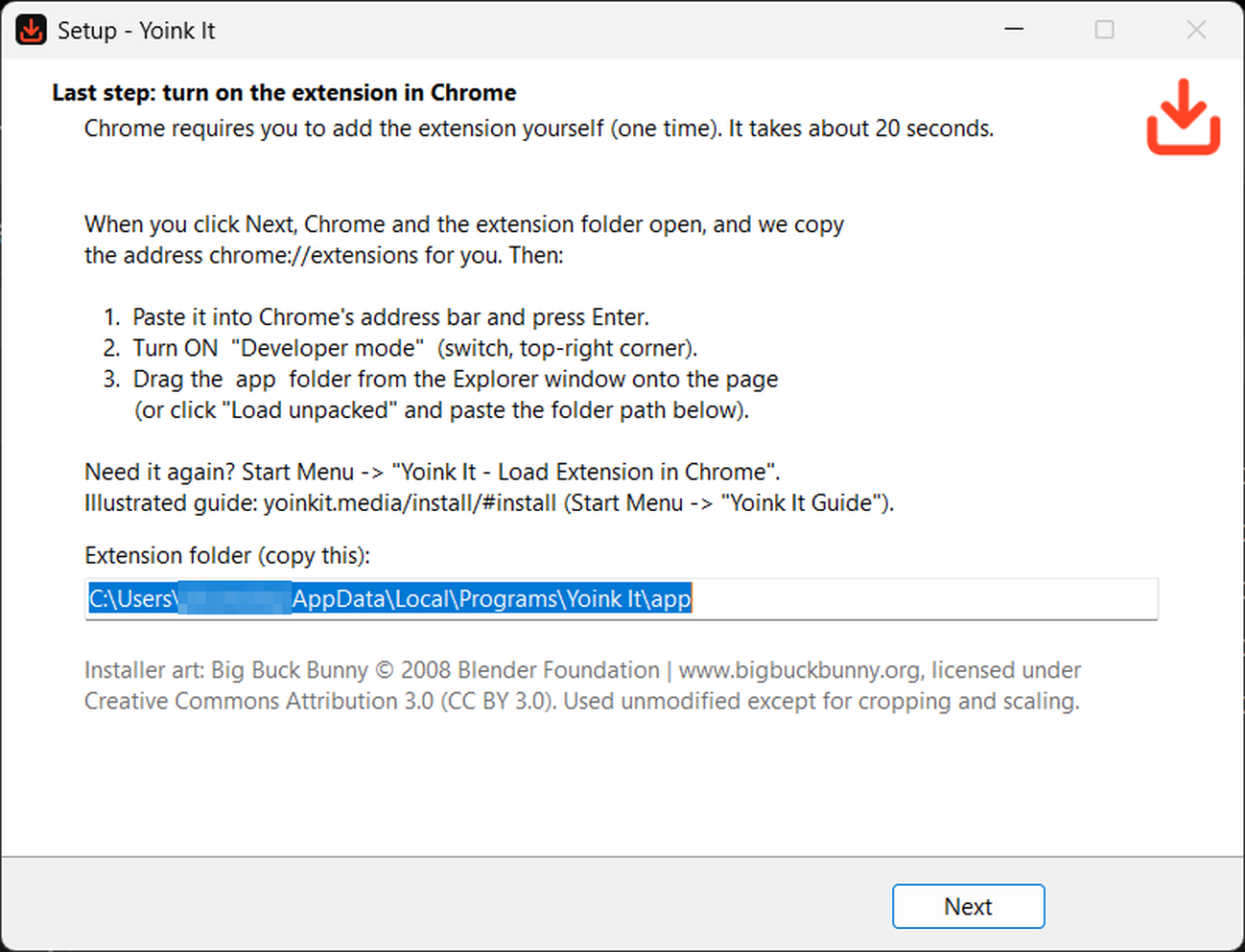
Last step. Click Next; Chrome and the app folder open. Setup - Yoink It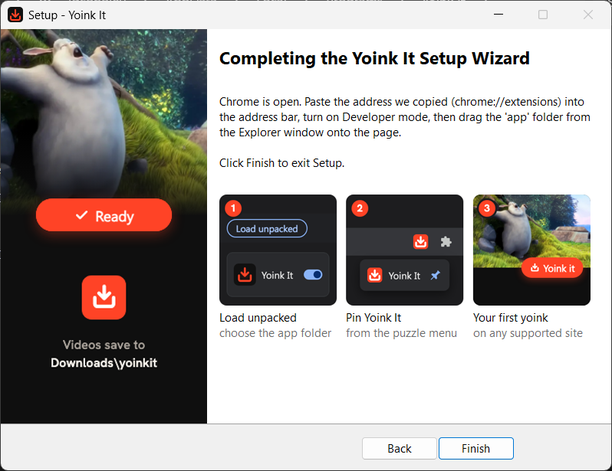
Click Finish. Chrome is open, and the Extensions address is on your clipboard. -
Run the installer
Open Terminal: press ⌘ Space, type Terminal, press Return. Click Copy below, paste into Terminal with ⌘ V, and press Return.
Terminal — macOSbash ~/Downloads/yoinkit-mac-0.7.0/host/bootstrap.sh
Unzipped it somewhere else? Type
bashand a space, dragbootstrap.shfrom itshostfolder into Terminal, and press Return.Expect these prompts. They're normal, and you only see them the first time.- "Terminal" would like to access files in your Downloads folder. Click Allow (or OK). It can appear the moment you press Return, before the installer starts.
- Password: type your Mac login password and press Return. Nothing appears while you type. That's normal.
- A macOS popup to install "command line developer tools": click Install and wait. This can take 5–15 minutes; leave both windows open. The Terminal window carries on by itself.
It installs
yt-dlp+ffmpeg(plus a speech-to-text model for videos without captions), registers the extension's fixed ID, and copies the helper to a safe place. The first run takes a few minutes.When it's done, it prints ▸ Helper installed., opens a Finder window with theappfolder selected, opens Chrome's Extensions page, and shows the last step in a box:What you'll see at the end — macOS▸ Helper installed. … ┌──────────────────────────────────────────────────────────────┐ │ Last step, in the Chrome window that just opened: │ │ 1. Turn on "Developer mode" (top right) and leave it on. │ │ 2. Drag the "app" folder from the Finder window onto the │ │ page, or click "Load unpacked" and choose that folder. │ │ 3. Click the puzzle piece, then pin Yoink It. Open any │ │ YouTube video and look for the Yoink it button. │ └──────────────────────────────────────────────────────────────┘ The "app" folder is: /Users/you/Downloads/yoinkit-mac-0.7.0/app
-
Load the extension into Chrome
The installer opened Chrome's Extensions page and a Finder window with the
appfolder selected. Chrome needs you to do this part by hand, once. (No Chrome window? Open Chrome, paste this address into the address bar, and press Return.)Chrome address barchrome://extensions
- Turn on "Developer mode" (top right) and leave it on.
Chrome may show a reminder about it; that's normal.
chrome://extensions
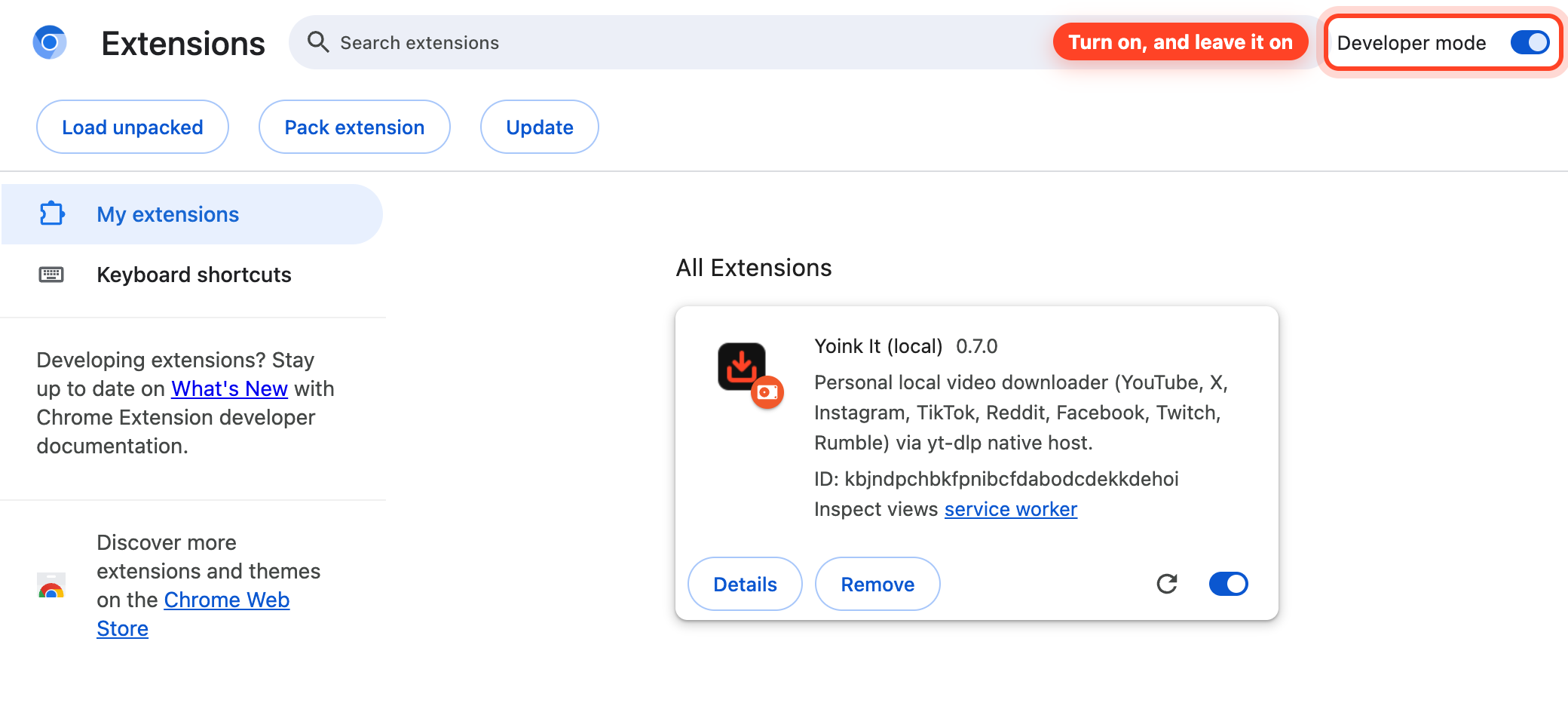
Developer mode: on. Top-right corner. Leave it on, or Chrome switches Yoink It off too. - Drag the "app" folder from the Finder window onto the page, or click
"Load unpacked" and choose that folder.
Using Load unpacked: click Downloads in the sidebar, double-click yoinkit-mac-0.7.0, click app, click Select.chrome://extensions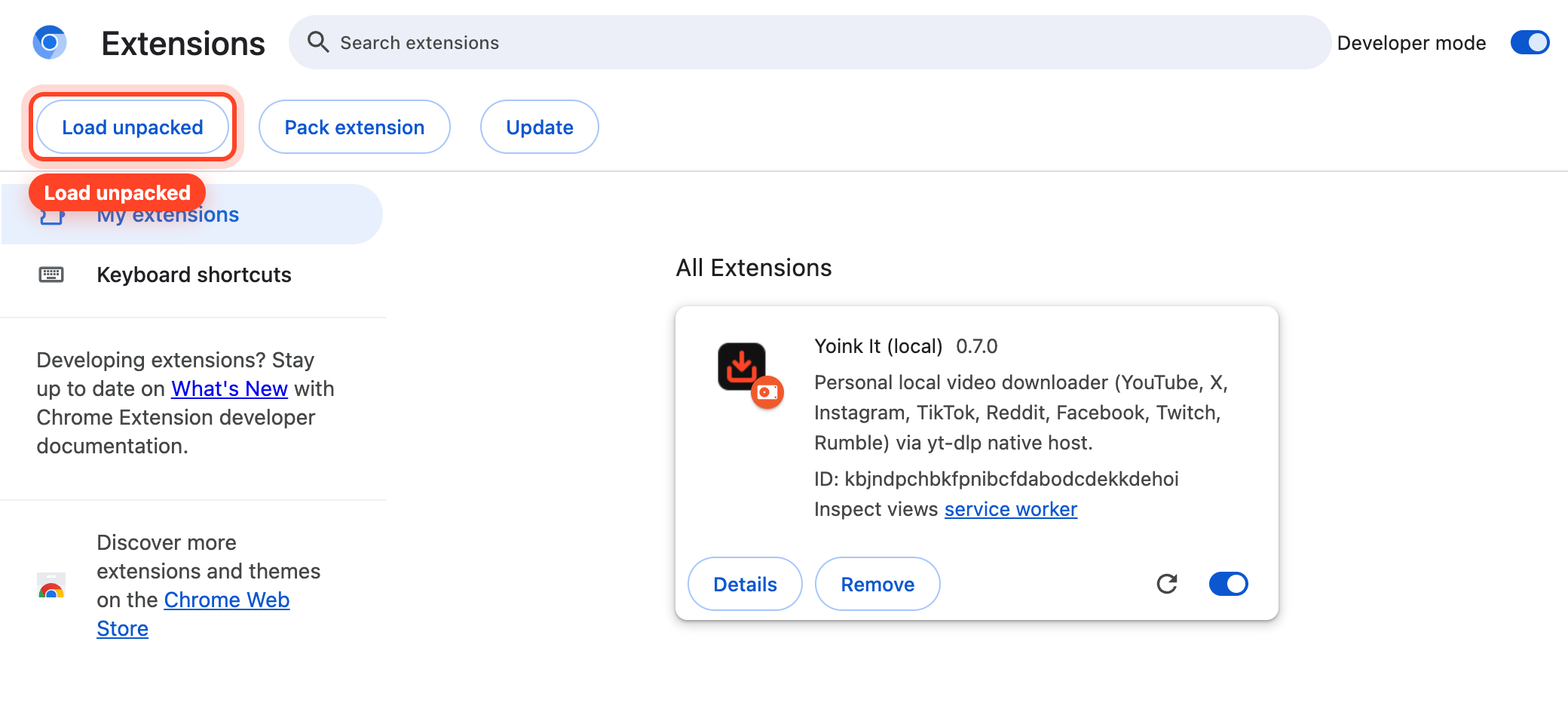
Load unpacked, top left. Once it's loaded, Yoink It (local) 0.7.0 appears as a card. Choose the app folder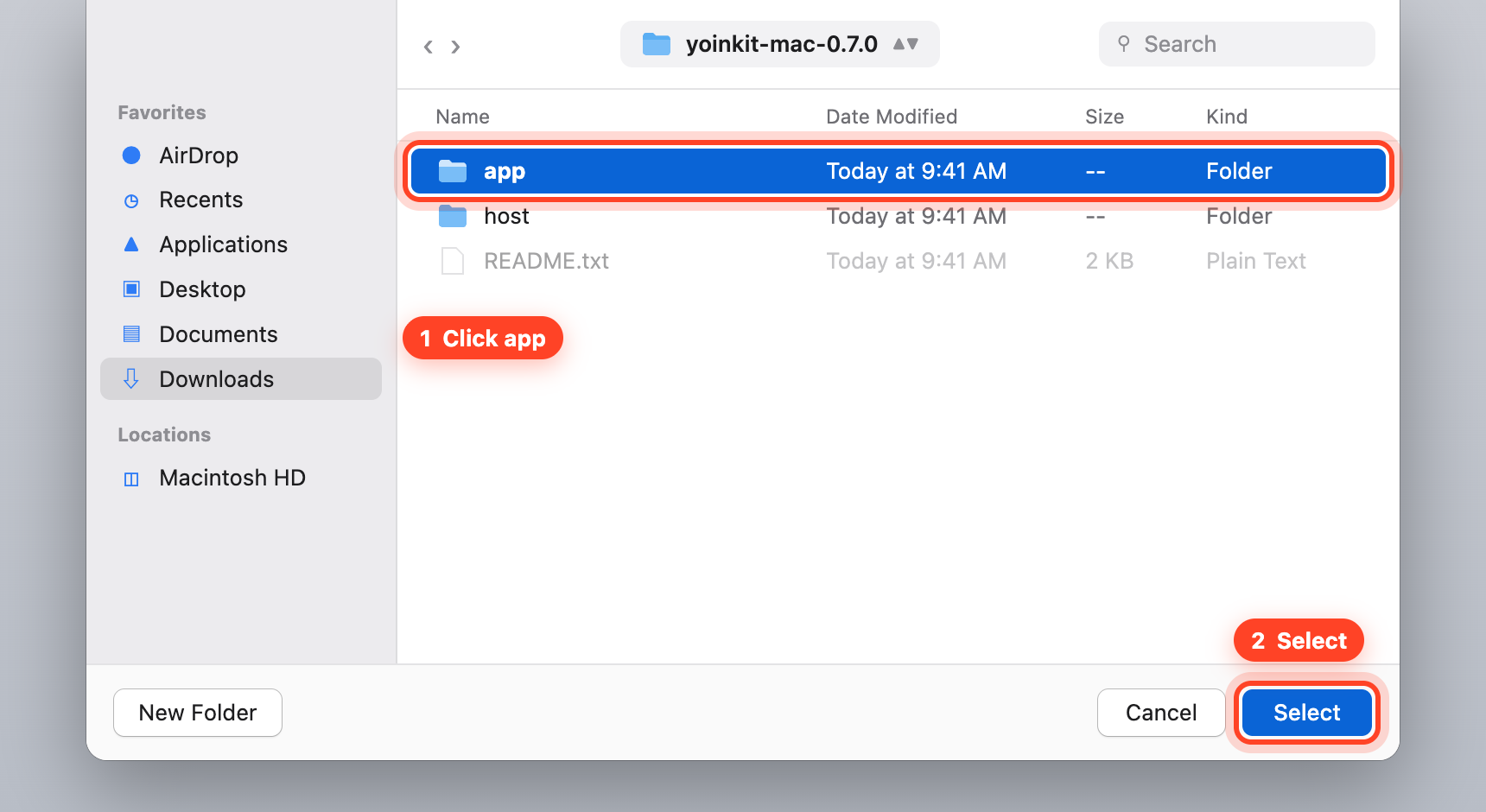
Click app, then Select. Pick theappfolder insideyoinkit-mac-0.7.0, notyoinkit-mac-0.7.0itself. - Pin it: click the puzzle piece, then pin Yoink It.
Chrome toolbar
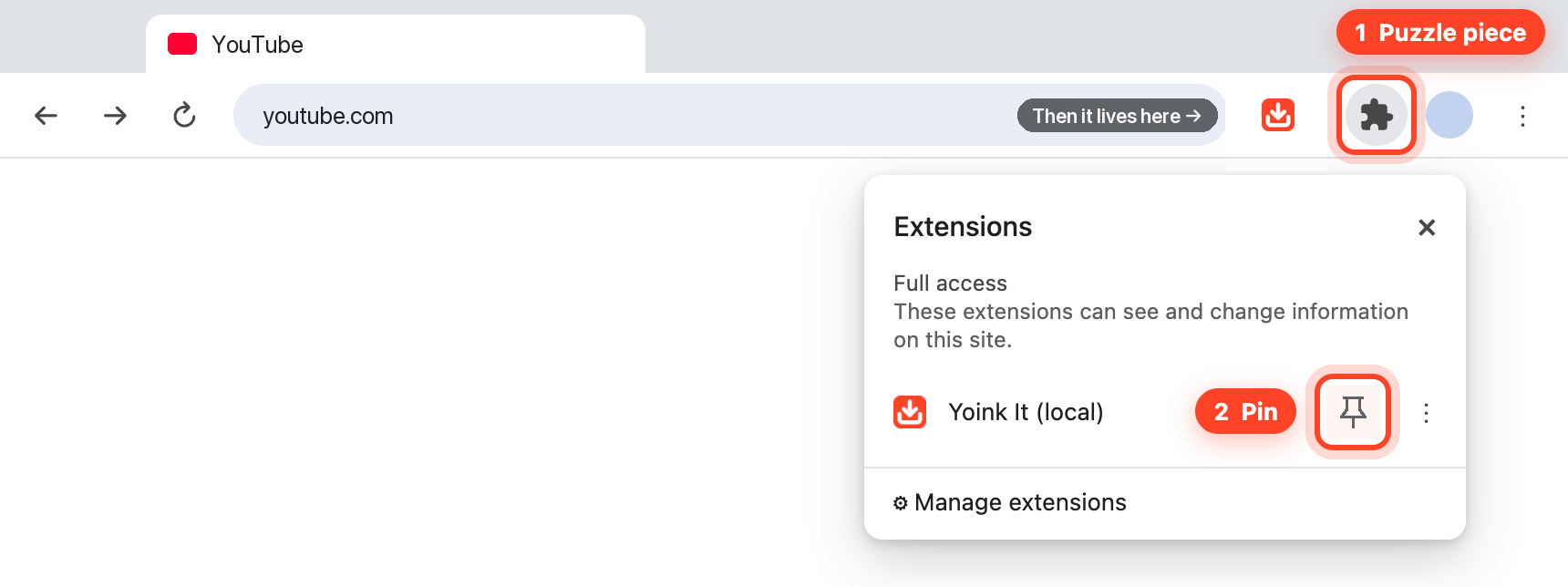
Puzzle piece → pin. The Yoink It icon then stays in your toolbar, one click from the popup.
The extension's ID is fixed (it ships a pinned key), so the installer already knows it. Nothing to copy or paste.
- Turn on "Developer mode" (top right) and leave it on.
Chrome may show a reminder about it; that's normal.
-
Load the extension into Chrome
When you click Next on the Last step page, Chrome opens, and a File Explorer window opens with the
appfolder already selected. Chrome needs you to do this part by hand, once:- Paste the address the installer copied (chrome://extensions) into Chrome's address bar
and press Enter. Clipboard empty? Copy it here:
Chrome address bar
chrome://extensions
- Turn on "Developer mode" (top right) and leave it on.
Chrome may show a reminder about it; that's normal.
chrome://extensions
Developer mode: on. Top-right corner. Leave it on, or Chrome switches Yoink It off too. - Drag the
appfolder from the Explorer window onto the page (or click Load unpacked and choose it).chrome://extensionsLoad unpacked, top left. Once it's loaded, Yoink It (local) 0.7.0 appears as a card. File Explorer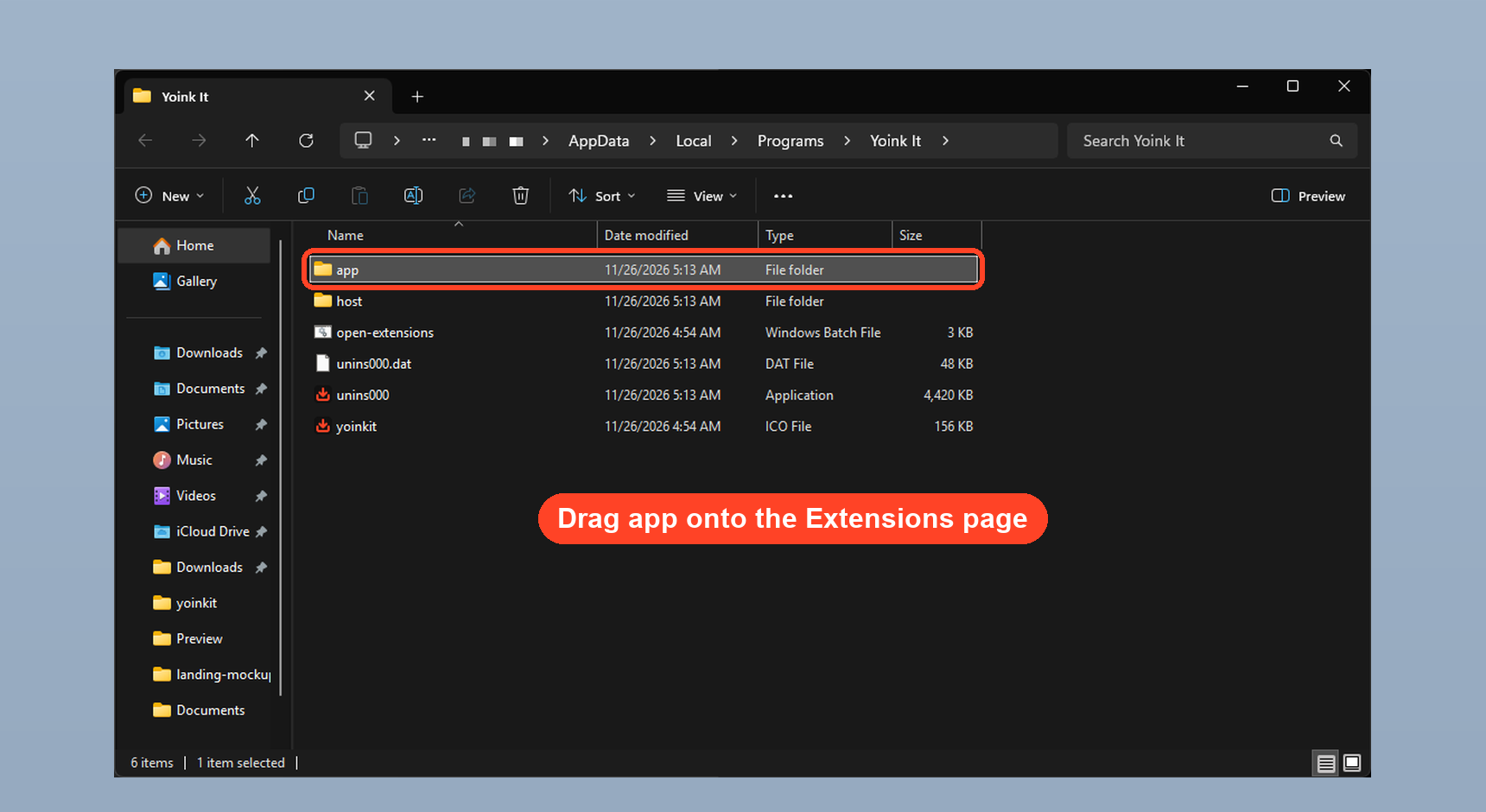
The app folder, already selected. Drag it onto the Extensions page. Using Load unpacked instead? Choose this same appfolder, notYoink Ititself. - Pin it: click the puzzle piece, then pin Yoink It.
Chrome toolbar
Puzzle piece → pin. The Yoink It icon then stays in your toolbar, one click from the popup.
Need to do this again later? The installer adds a Start-menu shortcut, "Yoink It - Load Extension in Chrome," that reopens the Extensions page and the File Explorer window withappselected, anytime. - Paste the address the installer copied (chrome://extensions) into Chrome's address bar
and press Enter. Clipboard empty? Copy it here:
-
Finish
Here's what done looks like: click the Yoink It icon you just pinned. The first time, the popup says You're set up ✓, then Connected · host v0.7.0. That means the extension and its helper are both installed.
Yoink It · popup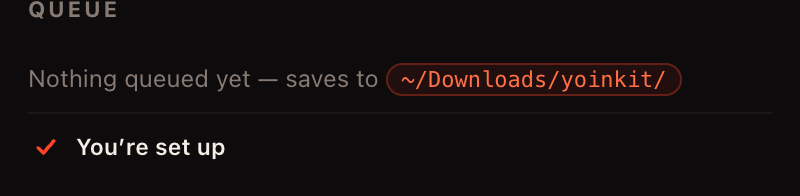
You're set up. After a few seconds it reads Connected · host v0.7.0. Then open any YouTube video: you'll see a Yoink it button under the player. Click it and the file lands in Downloads › yoinkit.
Popup says Host not found? → Troubleshooting.
If it doesn't respond the very first time, fully quit Chrome (⌘ Qclose every Chrome window), open it again, and try once more. Want to be sure everything works? Run the smoke test below.
That's it — enjoy. If Yoink It earns a spot in your toolkit, tossing a few bucks its way → keeps it fast and up to date.


Updating to a new version
Download the new release and double-click it. It unzips to its own folder, named
after the zip (for example yoinkit-mac-0.7.1), next to your install. Then run the
updater that came with it — it finds your install, copies the new
app and host over it, and never touches your downloads:
bash ~/Downloads/yoinkit-mac-0.7.1/host/update.sh # the folder you just unzipped
If the new folder has another name, type bash and a space, drag
update.sh from its host folder into Terminal, and press Return.
Download the new yoinkit-setup.exe and run it — it installs over
the old version in place, and your settings and history stay.
Then click the reload arrow on the Yoink It card at chrome://extensions/ and
reload any open YouTube, X, or Instagram tabs. yt-dlp keeps itself updated,
so you never update it by hand.
How do I download a video with Yoink It?
Two ways to grab anything — both fully local.
1 · The on-page button
On a YouTube watch page the Yoink it button sits in the native action row.
On X, Instagram, TikTok, Reddit, Facebook, Twitch, and Rumble it appears as a floating pill on a single
post/video page — and on X you can also yoink straight from a post's ··· menu.
One click starts the download. For anything else, paste the link into the popup.
2 · The popup manager
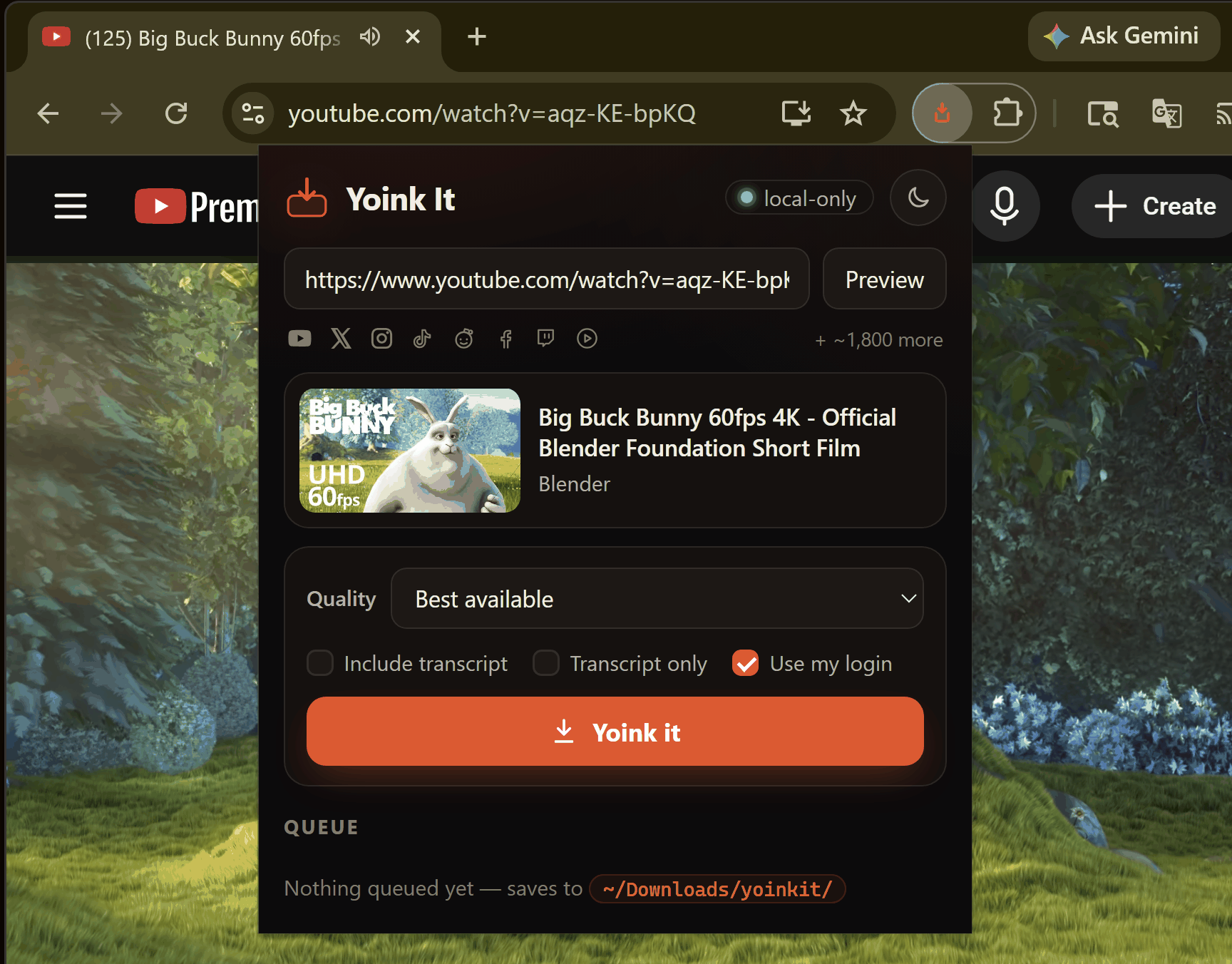
Click the toolbar icon to open the popup: paste any supported link, pick quality (up to 4K, or audio-only MP3/M4A), and watch a live queue with progress bars. Transcripts run as their own background job, so a video download never waits on speech-to-text.
How do I check it's working?
Use a video you're allowed to save — Big Buck Bunny is Creative Commons (CC BY 3.0, Blender Foundation).
Open https://www.youtube.com/watch?v=aqz-KE-bpKQ and click the gray
Yoink it chip under the video, next to Like and Share. Its label goes
Queued → Working → 12% … → Saved, with a thin bar filling along the bottom.
The file lands in
~/Downloads/yoinkit/%USERPROFILE%\Downloads\yoinkit\.
Click the folder icon on its row in the popup to
show it in Finderopen it in File Explorer.
If the chip says Failed, hover it to read the reason, then jump to Troubleshooting.
Why isn't Yoink It working?
I see "Host not found" in the popup
The popup says "Yoink It can’t reach its host — re-run the installer command." The "host" is the helper the installer sets up. The extension is loaded, but the helper isn't installed, or the install didn't finish. Go back to step 2, Run the installerstep 2, Run the installer, run it again, and let it finish. Then fully quit and reopen Chrome and open the popup again.
"Error communicating with the native messaging host" / "Native host has exited"
The helper either never launched, or launched and crashed. The first thing to do is look at the log — every launch and every failure is recorded there:
macOS log: ~/Downloads/yoinkit/yoinkit-host.log
Windows log: %USERPROFILE%\Downloads\yoinkit\yoinkit-host.log
— it's right alongside your downloads.
Re-run the installer, then read the log:
If the helper never registered, just re-run yoinkit-setup.exe —
it re-installs the helper and re-writes the native-host registry key. Then fully quit and reopen Chrome
(it reads the native-host registration on startup), and check the log alongside your downloads.
bash ~/Downloads/yoinkit-mac-0.7.0/host/bootstrap.sh
cat ~/Downloads/yoinkit/yoinkit-host.log
~/Library/Application Support/, outside the
protected Documents/Desktop/Downloads folders).
On Windows that means the native host didn't register — re-run
yoinkit-setup.exe, then fully quit and reopen Chrome.
A log that shows
WRAPPER and BOOT lines but the download still fails
means the helper launched and then hit an error — the lines after BOOT say why
(e.g. no Python found, or a yt-dlp error). Copy the whole log and send it along.
Button doesn't appear on the page
Reload the tab first, especially after an update. YouTube uses the native action row; X and Instagram show a floating pill that only
appears on a single post/status page (/status/,
/p/, /reel/,
/tv/) — not in the feed. If you changed extension files, reload the
extension at chrome://extensions/.
X / Instagram / Facebook / TikTok download fails with a login error
Lots of content on these sites needs you to be logged in — Facebook in particular works best when logged in, and some TikTok content is region- or age-gated. Make sure Use my login (cookies) is checked in the popup, and that you're logged into that site in your Default Chrome profile — the helper reads cookies from the Default profile only. macOS may show a one-time Keychain prompt ("Chrome Safe Storage") — click Allow.
A site "suddenly stopped working"
Sites change often. Yoink It keeps its own yt-dlp updated
automatically — daily, and immediately whenever YouTube refuses a download. If a site is still broken
after a day, update the helper: by running the latest
yoinkit-setup.exe again.
bash ~/Downloads/yoinkit-mac-0.7.0/host/bootstrap.sh # the folder you unzipped
macOS: "_wrapper.abi3.so" Not Opened
A Gatekeeper dialog when you start a download, after Yoink It's own copy of
yt-dlp updated itself. Don't click Move to Trash — click Done.
Since 0.7.0 the helper clears macOS's "downloaded" flag on its own, so this is rare; if it comes back,
run this once and try again (no Chrome restart needed):
xattr -dr com.apple.quarantine ~/Library/Application\ Support/yoinkit-host/ytdlp-venv
Already clicked Move to Trash? Re-run the installer (bash ~/Downloads/yoinkit-mac-0.7.0/host/bootstrap.sh)
to put the file back.
X: "No video could be found in this tweet"
X hides sensitive, age-restricted, and protected-account videos from guests and answers as if
there's no video. Sign in to X in Chrome (the Default profile), keep
Use my login checked in the popup, and try again. A cookies.txt has to be
exported while signed in to X — since 0.7.0 a guest-only file falls back to your
browser login automatically — export a fresh one from x.com while signed in.
Finder shows no preview, or QuickTime won't open a video
The file is fine: at most sizes YouTube's best stream is VP9 or AV1, which Apple's built-in apps don't play. Turn on Prefer Mac-compatible formats (side panel ⚙ Settings → Preferences, or Preferences above the Yoink it button in the popup) — it's on by default on a Mac — and new downloads come as H.264 + AAC. YouTube offers H.264 only up to 1080p, so 1440p and 4K still save as VP9/AV1. For files you already have, play them in Chrome, VLC, or IINA, or convert a copy:
cd ~/Downloads/yoinkit
ffmpeg -i "input.mp4" -c:v libx264 -crf 20 -preset medium -c:a aac -b:a 192k "input (Mac).mp4"
Setup says a download failed
yoinkit-setup.exe downloads the media tools during setup
(ffmpeg from gyan.dev, deno and yt-dlp from github.com, Python from python.org) and checks each file's
checksum. A dropped connection, or a firewall, VPN, or antivirus that blocks those sites, stops it — and
nothing is installed. Check your connection and click Retry. On a work or school network, try
another network or ask for github.com, gyan.dev, and python.org to be allowed. Still failing? Click
Cancel and use the offline installer (about 92 MB) — it
includes every tool and needs no internet during setup.
"Saved ✓" never shows but the file is on disk
Harmless. Chrome may sleep the extension's background worker mid-download; the helper runs as its own process and finishes regardless. Reopen the popup to re-sync the queue.
Is it safe to download videos this way?
Yoink It runs on your own computer. You install it from yoinkit.media, not the
Chrome Web Store. Your videos and download history stay on your computer; once a day it checks a
small version file on yoinkit.media so it can tell you when an update is out. The extension can only see its supported sites (no
<all_urls> access). The helper accepts input only from this one
extension (pinned by ID) over a pipe Chrome owns; it's not a network service and writes only to
~/Downloads/yoinkit/.
| Feature | Yoink It | Downloader websites | yt-dlp CLI |
|---|---|---|---|
| Where the download runs | Your computer | Their server | Your computer |
| Ads / pop-ups | None | Common | None |
| Account needed | No | Sometimes | No |
| Max quality | Up to 4K | Often capped | Up to source |
| One-click button on the page | Yes | No (copy/paste) | No (terminal) |
| Sites | 8 with a button + ~1,800 via yt-dlp | Varies | ~1,800 |
| Setup | Installer + Chrome extension | None | Terminal, manual updates |
When Use my login is enabled, yt-dlp reads your local Chrome
cookies and presents your session only to the source site — exactly as your browser already
does. Nothing is transmitted to any third party.
Downloading content may violate a site's terms of service. Clear-cut exceptions are content you uploaded yourself or that is Creative Commons / public domain. You are responsible for the legality of each download. This tool is for personal local use only.
Frequently asked questions
Is Yoink It safe?
Yes. Yoink It runs yt-dlp and ffmpeg on your own computer and is installed from yoinkit.media, not the Chrome Web Store. Your videos and download history stay on your computer. Once a day it checks a small version file on yoinkit.media so it can tell you when an update is out. The extension can only access the handful of sites it supports, and the helper that does the downloading only accepts input from this one extension over a private channel Chrome controls.
Does it upload my videos anywhere?
No. Nothing you download is ever uploaded. Yoink It runs yt-dlp and ffmpeg locally and writes files only to your Downloads folder. The download happens between your computer and the site you're watching, not on someone else's machine.
Is it really free, with no ads and no account?
Yes. The Yoink it button on every supported site, and the popup, are free for good: no ads, no account, no watermark. Clips, playlists and the side panel are Pro features, and they're included free during the launch preview.
Why is Yoink It open-source-based, and how does local-only actually work?
Yoink It is built on the open-source tools yt-dlp and ffmpeg, which are public, audited, and updated almost weekly as sites change. Local-only means the browser extension simply hands a link to a small helper program installed on your machine; that helper runs yt-dlp and ffmpeg to fetch and combine the media, then saves it to your Downloads folder. Your videos are never uploaded anywhere.
How do I download a video from YouTube?
Open a YouTube watch page and click the Yoink it button that appears in YouTube's native action row, or open the popup and paste the link. Pick your quality up to 4K, or choose audio-only, and the file saves straight to your Downloads folder.
How do I download from X, Instagram, or TikTok?
On a single post, status, reel, or video page, a floating Yoink it pill appears; click it to download. On X you can also yoink straight from a post's ··· menu. Paste the link into the popup for anything you can't reach with the on-page button. Some Instagram and TikTok content is private, region-gated, or age-gated, so enable "Use my login" and stay signed in to that site in your Default Chrome profile.
Can I download from Facebook, Twitch, Reddit and Rumble too?
Yes, with a few honest caveats. Facebook works best when you are logged in, so enable "Use my login." Twitch supports clips and VODs, not active live streams. Reddit supports video posts. Rumble videos download directly. Beyond these, yt-dlp adds support for roughly 1,800 more sites you can use through the popup.
What video quality can I download, and can I get audio only?
You can download video quality up to 4K when the source provides it. You can also grab audio only as MP3 or M4A, which is handy for music, podcasts, and talks where you don't need the picture.
Can it create a transcript of a video?
Yes. Yoink It can produce a clean, timestamped Markdown transcript. When a video already has captions it de-duplicates them into readable text; when there are no captions it can transcribe the audio locally using Whisper speech-to-text. Transcripts run as their own background job, so they never delay your download.
Why use a local helper instead of a browser-only or online downloader?
Browser-only and online downloaders break constantly because sites use ciphered, expiring, and split audio/video streams, and online sites also see every link you paste. yt-dlp is the battle-tested engine that handles those streams and ships fixes within days, and running it locally means your links and downloads stay entirely on your machine.
Which operating systems does it support?
Yoink It runs on macOS 11 or newer and on Windows 10 or 11, alongside a current version of Google Chrome. The installer sets up yt-dlp and ffmpeg for you on both platforms; on Windows the setup wizard downloads them, plus a private copy of Python, while it runs, and an offline installer bundles everything.
Is it legal to download videos with Yoink It?
That depends on the content and the site's terms of service. Clear-cut safe cases include content you uploaded yourself or material that is Creative Commons or public domain. You are responsible for the legality of each download, and Yoink It is intended for personal, local use only.