One button, everywhere you watch
Yoink It drops a Download button right where you already are, and a power-user popup for everything else.
Find a video
Open a YouTube watch page, an X post, an Instagram reel, or a TikTok / Reddit / Facebook / Twitch / Rumble video — the button appears in YouTube's action row or as a floating pill on the others. Or just paste any link into the popup.
Yoink it
Click once. Or open the popup to paste any link, pick quality up to 4K — or audio-only MP3/M4A — and watch a live queue with progress bars.
It's on your disk
Files land in a local folder with a "Show in Finder" button. Want the words too? Get a clean Markdown transcript — from captions, or local speech-to-text when there are none.
Does it upload my videos to a server?
No — it's private by design, not by promise. The opposite of an "online video downloader": there is no server to trust, because there isn't one.
Nothing leaves your machine
No account, no upload, no third-party servers — there are none. The download engine runs locally and writes only to your Downloads folder.
Built to keep working
Powered by yt-dlp, the open-source engine that ships fixes within days when sites change their players — and already supports ~1,800 sites.
Readable transcripts
Turn any video into clean, timestamped Markdown — de-duplicated from captions, or transcribed locally with Whisper when captions don't exist. It never blocks your download.
Minimal footprint
The extension only touches the handful of sites it supports — no <all_urls>, no tracking. Just nativeMessaging and those hosts.
Help keep the private alternative alive
There's no company here — nothing to sell, no ads, nothing to harvest. Yoink It rides on
open-source yt-dlp and ffmpeg,
which patch almost weekly as sites change, and keeping pace with that is real, ongoing work.
If this saved you time — or a trip to a sketchy downloader site — a small contribution keeps
it free, current, and clean for everyone.
No pressure, ever — the tool is yours either way.
How does it work under the hood?
| Half | What it does |
|---|---|
The extensionapp/ |
A Manifest V3 Chrome extension. Drops a one-click Yoink it button onto YouTube, X,
Instagram, TikTok, Reddit, Facebook, Twitch, and Rumble, plus a popup that takes any of ~1,800
yt-dlp sites — with quality/format options, a live queue, and Markdown transcript export. |
The native hosthost/ |
A tiny local program the extension talks to over Chrome's Native Messaging channel.
It runs yt-dlp + ffmpeg to actually
fetch and mux the media into ~/Downloads/yoinkit/. |
yt-dlp is the
battle-tested engine that handles all of that and ships fixes within days — and because it
supports ~1,800 sites, Yoink It reaches well beyond its eight first-class ones.
Prerequisites
- Google Chrome (current version).
- macOS 11+. The installer adds
yt-dlpandffmpegfor you (via Homebrew, which it installs if missing). - A network connection for the first install.
python3. You don't need to install it yourself.- Google Chrome (current version).
- Windows 10 or 11.
- No Python required. The release bundles
yt-dlp.exeandffmpeg.exe(standalone, no Python). If your PC has no Python, the installer fetches a small portable copy automatically. - A network connection for the first install.
↓Install
-
Download & unzip the releaseDownload the installer
Click Download above to get
yoinkit-mac-<version>.zip, then unzip it. It extracts to a single folder namedyoinkit— keep it in your Downloads folder (~/Downloads/yoinkit/). Inside you'll find two things you use:app/(the Chrome extension) andhost/(the installer + helper), plus aREADME.txtwith the exact commands below.Click Download for Windows above to get a single file:
yoinkit-setup.exe. That's the whole installer — no zip to unpack, no folders to arrange. Just save it somewhere you can find it, like your Downloads folder.Downloads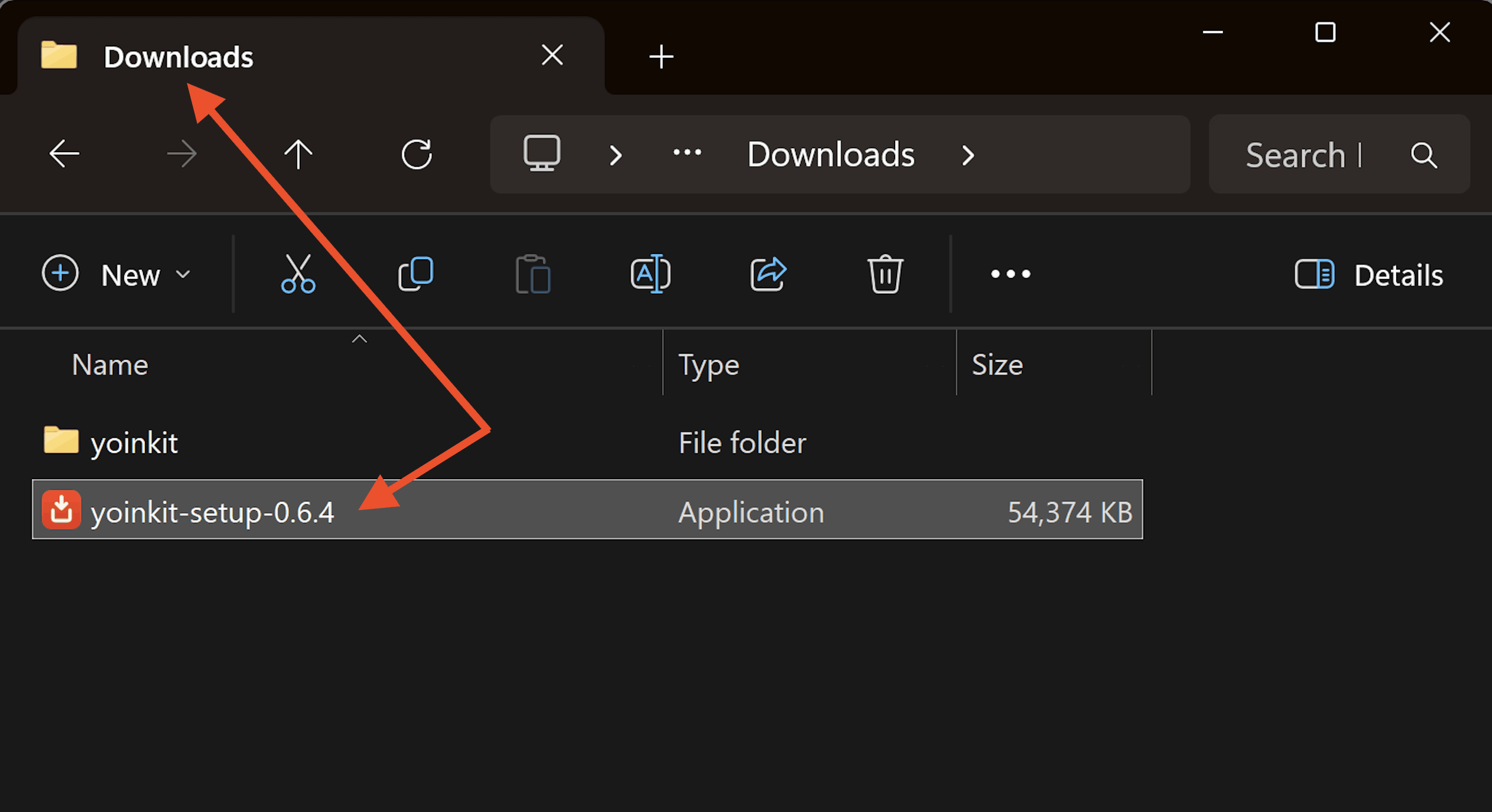
The installer, saved. One file in your Downloads — double-click it to start the wizard. macOS note: the installer copies the helper out of this folder into~/Library/Application Support/automatically, so it's fine to keep the unzipped folder in Documents or Downloads even though Chrome can't execute from there directly. -
Load the extension into Chrome
Chrome requires this step to be done by hand once — it can't be automated.
- Open chrome://extensions/ (paste into the address bar).
- Turn on Developer mode (top-right toggle).
- Click Load unpacked and select the
yoinkit/appfolder inside what you unzipped (theappfolder, not its parent).
chrome://extensions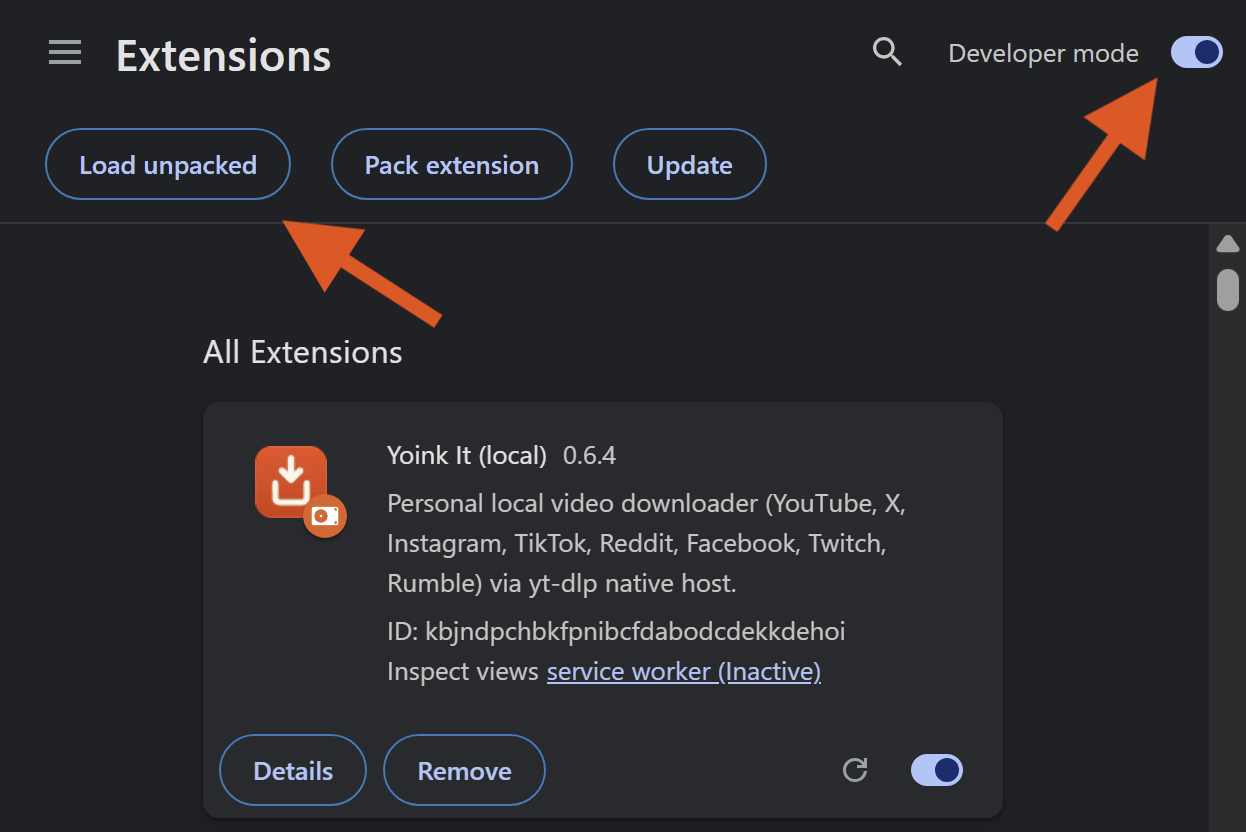
Developer mode → Load unpacked. This is where most people get stuck — the visual makes it obvious. You'll see Yoink It (local) appear as a card. Its ID is fixed (the extension ships a pinned key), so the installer already knows it — no need to copy it. Leave this tab open.
Select the app folder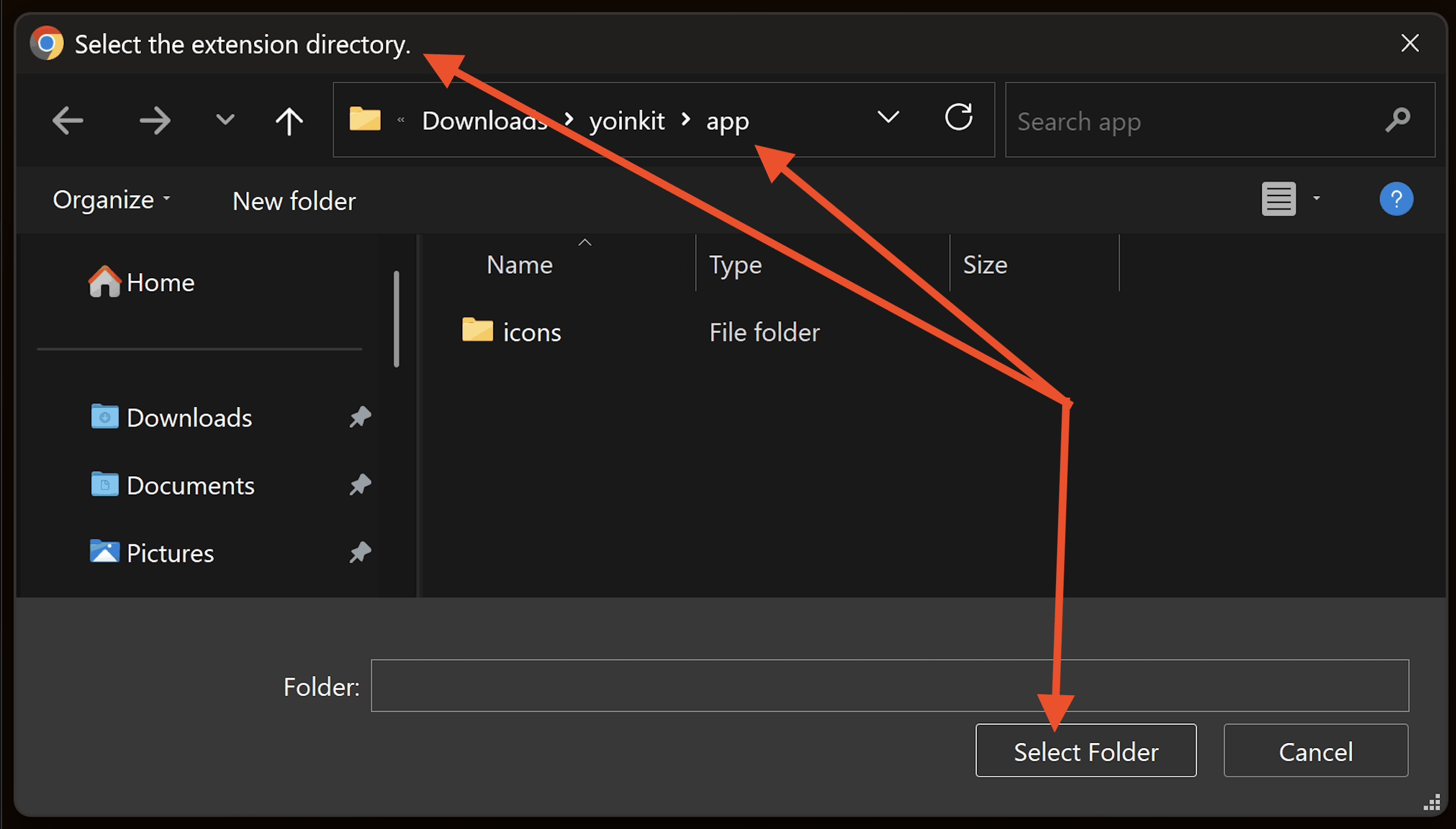
Pick the appfolder. Point Chrome atyoinkit/app— the folder inside what you unzipped, not its parent. -
Run the installer
Double-click
yoinkit-setup.exeand click through the setup wizard — Install, then Finish. No terminal, no commands, and no admin password (it installs just for you). Behind the scenes it sets up the native helper plus a bundled copy of Python,yt-dlp, andffmpeg— nothing else for you to install.Expect one extra confirmation. Because the installer is brand-new and not yet code-signed, Windows may show a blue "Windows protected your PC" screen. This is normal for new apps — click More info, then Run anyway, and the wizard opens. (We're working on a signed installer to remove this prompt.)yoinkit-setup.exeScreenshot slotCapture: the SmartScreen "Windows protected your PC" dialog with the More info → Run anyway path highlighted, plus a frame of the setup wizard.More info → Run anyway. A one-time confirmation Windows shows for any new, unsigned app — then it's a normal setup wizard. -
Run the installer
Open Terminal, then run this from inside the unzipped folder. It installs
yt-dlp+ffmpeg, registers the extension's fixed ID, copies the helper to a safe location, and sets up the host.Terminal — macOScd ~/Downloads/yoinkit # wherever you unzipped it chmod +x host/bootstrap.sh ./host/bootstrap.sh
The installer prints where it placedyt-dlp,ffmpeg, the helper, and the manifest. If you see those four lines, registration succeeded.Terminal — bootstrap.shScreenshot slotCapture: the installer's final output — the four "placed …" lines that confirm success.A successful install. Showing the expected output reassures people it worked. -
Load the extension into Chrome
When the wizard finishes, Chrome opens automatically to its Extensions page. There's one last step — the standard one Chrome requires for any side-loaded extension:
- Turn on Developer mode (top-right toggle).
- Click Load unpacked (top-left).
- Select the
Yoink It\appfolder the installer points you to — the wizard's final page shows the exact path, so you can copy it straight from there.
Need to do this again later? The installer adds a Start-menu shortcut, "Yoink It - Load Extension in Chrome," that reopens the Extensions page and shows the folder path anytime.chrome://extensions
Developer mode → Load unpacked. The one manual step Chrome requires for every side-loaded extension — and the wizard hands you the exact folder. Select the app folder
Select the appfolder. Use the exact path the wizard's final page shows you — paste or browse toYoink It\app.You'll see Yoink It (local) appear as a card. Its ID is pinned, so the installer already targets it — nothing to copy or paste.
-
Finish
The native manifest is read fresh on each connection, so you usually don't need to reload — but if you just changed a file under
yoinkit/, click the reload icon on the extension card. Then open a YouTube video and click Yoink it.That's it — the helper is already wired up. Open a YouTube video (or any supported page) and click Yoink it. If it doesn't respond the very first time, fully restart Chrome once and try again.
That's it — enjoy. If Yoink It earns a spot in your toolkit, tossing a few bucks its way → keeps it fast and up to date.
Using it
Two ways to grab anything — both fully local.
1 · The on-page button
On a YouTube watch page the Yoink it button sits in the native action row.
On X, Instagram, TikTok, Reddit, Facebook, Twitch, and Rumble it appears as a floating pill on a single
post/video page — and on X you can also yoink straight from a post's ··· menu.
One click starts the download. For anything else, paste the link into the popup.
2 · The popup manager
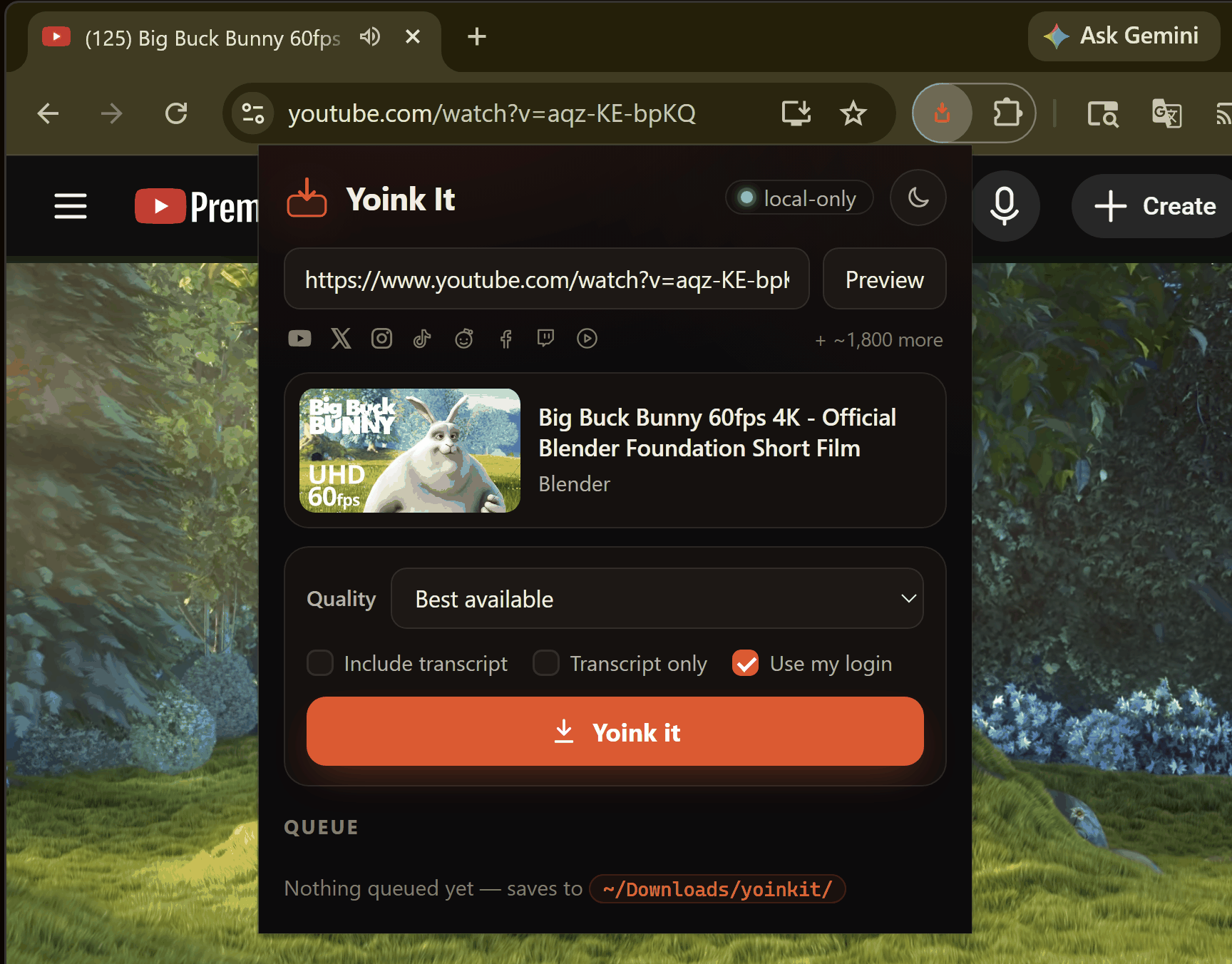
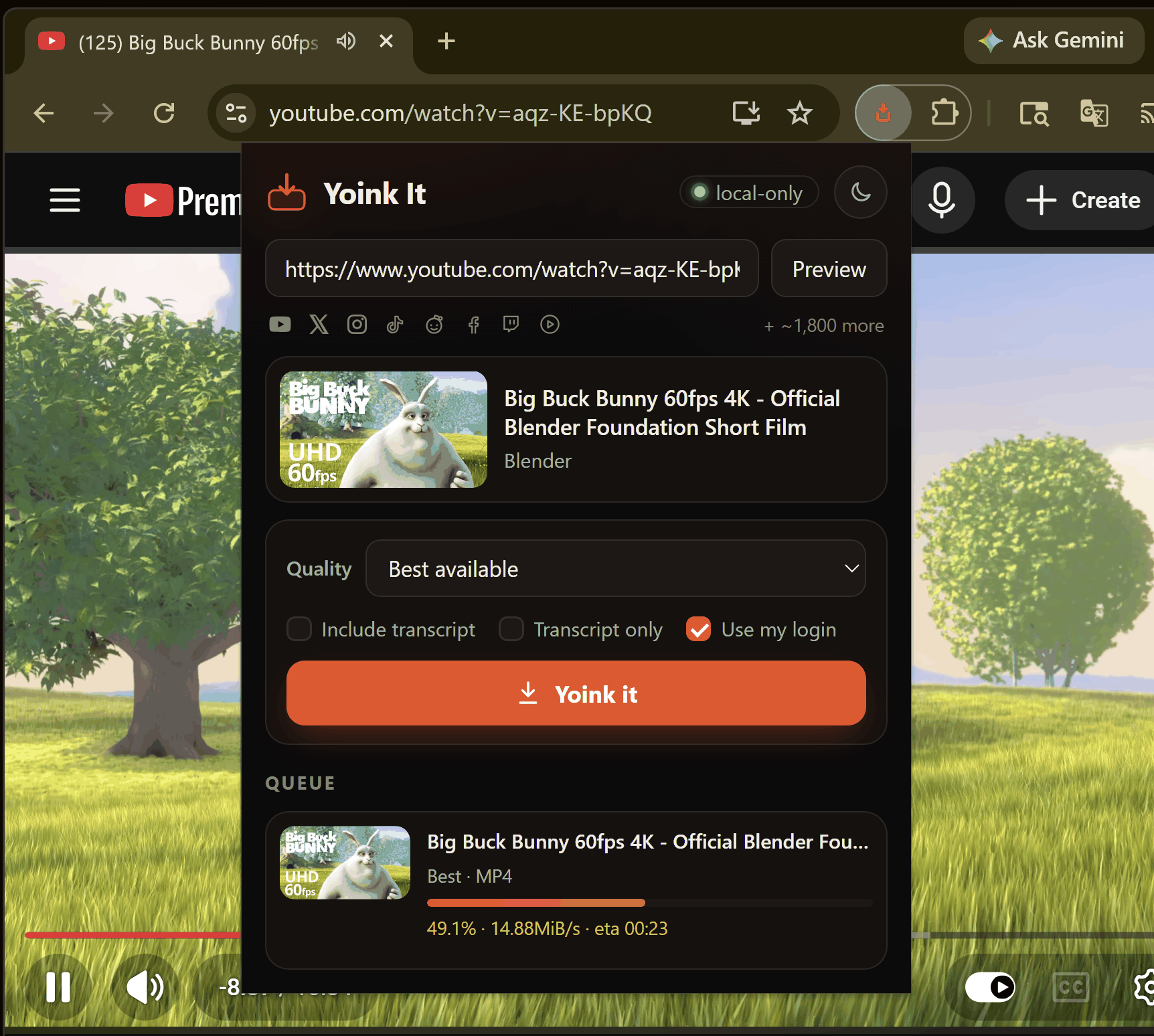
Click the toolbar icon to open the popup: paste any supported link, pick quality (up to 4K, or audio-only MP3/M4A), and watch a live queue with progress bars. Transcripts run as their own background job, so a video download never waits on speech-to-text.
Smoke test
Nothing to do here on Windows — yoinkit-setup.exe already installed and
registered the helper for you. Just open a video and click Yoink it. If anything looks off,
jump to Troubleshooting.
Confirm the helper works before involving the extension. This downloads a short clip straight from the command line.
./host/test_host.py "https://www.youtube.com/watch?v=aqz-KE-bpKQ" --720
Expect framed started → progress… →
done with code: 0, and a file in
~/Downloads/yoinkit/.
Other flags: --audio-mp3, --audio-m4a,
--1080, --transcript,
--transcript-only.
Troubleshooting
"Error communicating with the native messaging host" / "Native host has exited"
The helper either never launched, or launched and crashed. The first thing to do is look at the log — every launch and every failure is recorded there:
macOS log: ~/Downloads/yoinkit/yoinkit-host.log
Windows log: %USERPROFILE%\Downloads\yoinkit\yoinkit-host.log
— it's right alongside your downloads.
Re-run the installer, then read the log:
If the helper never registered, just re-run yoinkit-setup.exe —
it re-installs the helper and re-writes the native-host registry key. Then fully quit and reopen Chrome
(it reads the native-host registration on startup), and check the log alongside your downloads.
./host/bootstrap.sh
cat ~/Downloads/yoinkit/yoinkit-host.log
~/Library/Application Support/, outside the
protected Documents/Desktop/Downloads folders).
On Windows that means the native host didn't register — re-run
yoinkit-setup.exe, then fully quit and reopen Chrome.
A log that shows
WRAPPER and BOOT lines but the download still fails
means the helper launched and then hit an error — the lines after BOOT say why
(e.g. no Python found, or a yt-dlp error). Copy the whole log and send it along.
Button doesn't appear on the page
YouTube uses the native action row; X and Instagram show a floating pill that only
appears on a single post/status page (/status/,
/p/, /reel/,
/tv/) — not in the feed. If you changed extension files, reload the
extension at chrome://extensions/.
X / Instagram / Facebook / TikTok download fails with a login error
Lots of content on these sites needs you to be logged in — Facebook in particular works best when logged in, and some TikTok content is region- or age-gated. Make sure Use my login (cookies) is checked in the popup, and that you're logged into that site in your Default Chrome profile — the helper reads cookies from the Default profile only. macOS may show a one-time Keychain prompt ("Chrome Safe Storage") — click Allow.
A site "suddenly stopped working"
Almost always a stale yt-dlp. Update it:
brew upgrade yt-dlp
& "$env:LOCALAPPDATA\yoinkit-host\yt-dlp.exe" -U
"Saved ✓" never shows but the file is on disk
Harmless. Chrome may sleep the extension's background worker mid-download; the helper runs as its own process and finishes regardless. Reopen the popup to re-sync the queue.
Is it safe to download videos this way?
Yoink It is local-only. It is not on the Chrome Web Store and talks to no servers of ours
— there are none. The extension can only see its supported sites (no
<all_urls> access). The helper accepts input only from this one
extension (pinned by ID) over a pipe Chrome owns; it's not a network service and writes only to
~/Downloads/yoinkit/.
When Use my login is enabled, yt-dlp reads your local Chrome
cookies and presents your session only to the source site — exactly as your browser already
does. Nothing is transmitted to any third party.
Downloading content may violate a site's terms of service. Clear-cut exceptions are content you uploaded yourself or that is Creative Commons / public domain. You are responsible for the legality of each download. This tool is for personal local use only.
Frequently asked questions
Is Yoink It safe?
Yes. Yoink It is local-only: it runs entirely on your own computer, is not on the Chrome Web Store, and talks to no servers of ours because there are none. The extension can only access the handful of sites it supports, and the helper that does the downloading only accepts input from this one extension over a private channel Chrome controls.
Does it upload my videos anywhere?
No. Nothing you download is ever uploaded. Yoink It runs yt-dlp and ffmpeg locally and writes files only to your Downloads folder. There is no cloud, no queue on someone else's machine, and no third-party server involved at any step.
Is it really free, with no ads and no account?
Yes. Yoink It is free, has no ads, and never asks you to create an account or sign in to use it. There is no company behind it and nothing to sell. If it earns a spot in your toolkit, an optional contribution helps keep it maintained, but the tool is fully yours either way.
Why is Yoink It open-source-based, and how does local-only actually work?
Yoink It is built on the open-source tools yt-dlp and ffmpeg, which are public, audited, and updated almost weekly as sites change. Local-only means the browser extension simply hands a link to a small helper program installed on your machine; that helper runs yt-dlp and ffmpeg to fetch and combine the media, then saves it to your Downloads folder. No data leaves your computer.
How do I download a video from YouTube?
Open a YouTube watch page and click the Yoink it button that appears in YouTube's native action row, or open the popup and paste the link. Pick your quality up to 4K, or choose audio-only, and the file saves straight to your Downloads folder.
How do I download a video from X (Twitter), Instagram, or TikTok?
On a single post, status, reel, or video page, a floating Yoink it pill appears; click it to download. On X you can also yoink straight from a post's ··· menu. Paste the link into the popup for anything you can't reach with the on-page button. Some Instagram and TikTok content is private, region-gated, or age-gated, so enable "Use my login" and stay signed in to that site in your Default Chrome profile.
Can I download from Facebook, Twitch, Reddit, and Rumble too?
Yes, with a few honest caveats. Facebook works best when you are logged in, so enable "Use my login." Twitch supports clips and VODs, not active live streams. Reddit supports video posts. Rumble videos download directly. Beyond these, yt-dlp adds support for roughly 1,800 more sites you can use through the popup.
What video quality can I download, and can I get audio only?
You can download video quality up to 4K when the source provides it. You can also grab audio only as MP3 or M4A, which is handy for music, podcasts, and talks where you don't need the picture.
Can it create a transcript of a video?
Yes. Yoink It can produce a clean, timestamped Markdown transcript. When a video already has captions it de-duplicates them into readable text; when there are no captions it can transcribe the audio locally using Whisper speech-to-text. Transcripts run as their own background job, so they never delay your download.
Why use a local helper instead of a browser-only or online downloader?
Browser-only and online downloaders break constantly because sites use ciphered, expiring, and split audio/video streams, and online sites also see every link you paste. yt-dlp is the battle-tested engine that handles those streams and ships fixes within days, and running it locally means your links and downloads stay entirely on your machine.
Which operating systems does it support?
Yoink It runs on macOS 11 or newer and on Windows 10 or 11, alongside a current version of Google Chrome. The installer sets up yt-dlp and ffmpeg for you on both platforms; on Windows it can fetch a small portable Python automatically if your PC doesn't have one.
Is it legal to download videos with Yoink It?
That depends on the content and the site's terms of service. Clear-cut safe cases include content you uploaded yourself or material that is Creative Commons or public domain. You are responsible for the legality of each download, and Yoink It is intended for personal, local use only.